
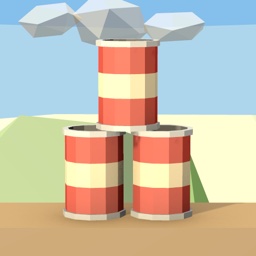
On The Fence: Knock Down Cans
An old wooden fence, a stack of empty cans, and a handful of stones. No timer, no rush.
- Android
- Free, with ads
About
On The Fence is a relaxing physics game about knocking down cans. Tap where you want to throw, and knock every can off the fence before your stones run out. There’s no timer, no score to chase, and nothing to lose: if a few cans are still standing when the stones are gone, have another go at the same stack. It’s a calm game in low-poly scenery, with soft music, birdsong, and wind, for a few minutes or an evening.
Features
- Hundreds of levels that grow gently: more cans, taller stacks, and a few stones fewer to spare.
- Four kinds of targets. Tin cans, wooden crates, plastic cups, and glass bottles, each stacking, falling, and sounding like what it’s made of.
- Real physics. Hit the right can at the bottom and the rest of the stack comes tumbling down with it.
- A small puzzle in every stack: pick which can to hit, and clear the fence with the stones you have.
- One-finger controls, in landscape. Tap to throw a stone.
- Four backgrounds: a meadow, a golden sunset, a snowy morning, and a moonlit night with fireflies.
- Quiet sound. Soft music, and birdsong and wind in the background. Music, ambience, and sound effects each have their own volume. Your own music keeps playing if you prefer it.
- Light vibration when a stone hits and when you clear the fence, which you can switch off.
- Easy on you. Text follows your system font size, every button is large enough to hit, a Reduce motion setting follows your system setting until you change it, and the game works with TalkBack.
- Plays offline. The game needs no internet connection; only the ads do.
- No account. Your progress is saved on your device, with no sign-in.
Requirements
- Android 8.0 or later.
- Free to download, supported by ads: one banner at the top of the screen, and two optional video ads that only play when you tap their button. One gives you three extra stones on each of your next five levels; the other unlocks a background for good. No ad ever interrupts a throw, and the game plays the same without the videos.
Privacy
On The Fence is covered by the Protoboard Studios Privacy Policy. Here is how it applies to this app:
| Topic | In On The Fence |
|---|---|
| Account | None. There’s no sign-in, and the game doesn’t ask for your name, email, or other personal details. |
| Permissions | Vibration, for the optional hit and clear pulses. Everything else comes from Google’s ads software: internet and network status, to load ads; the advertising ID, plus Android’s ad-measurement and ad-topics permissions; and background-work permissions it uses to run its own tasks. No location, camera, microphone, contacts, or file access. |
| Progress | Your progress and settings are saved on your device, in the game’s private storage, and never sent to us. They’re included in your device’s Android backup if you have backup turned on, so they come back if you reinstall the game or move to a new phone. Reset progress in Settings starts you over at level 1. |
| Ads | A banner and opt-in video ads from Google AdMob. Google’s ads software collects device information and identifiers, such as your device’s advertising ID; your IP address, from which it estimates your approximate location; how you interact with the app and its ads, such as app launches, taps, and video views; and app performance data, such as launch time. Google uses this to serve, measure, and analyze ads and to prevent fraud. Where the law requires it, the game asks for your choice before any ad is requested, and you can change it later under Settings > Privacy options. See Advertising for how to opt out of personalized ads. |
| Crash reports | None. The game has no crash reporting. |
| Analytics | None. The game itself records nothing about how you play; only the ads software collects the data described under Ads. |
Support
Found a bug or have a question? Email support@protoboardstudios.com and include your Android version and device model if something isn’t working.